

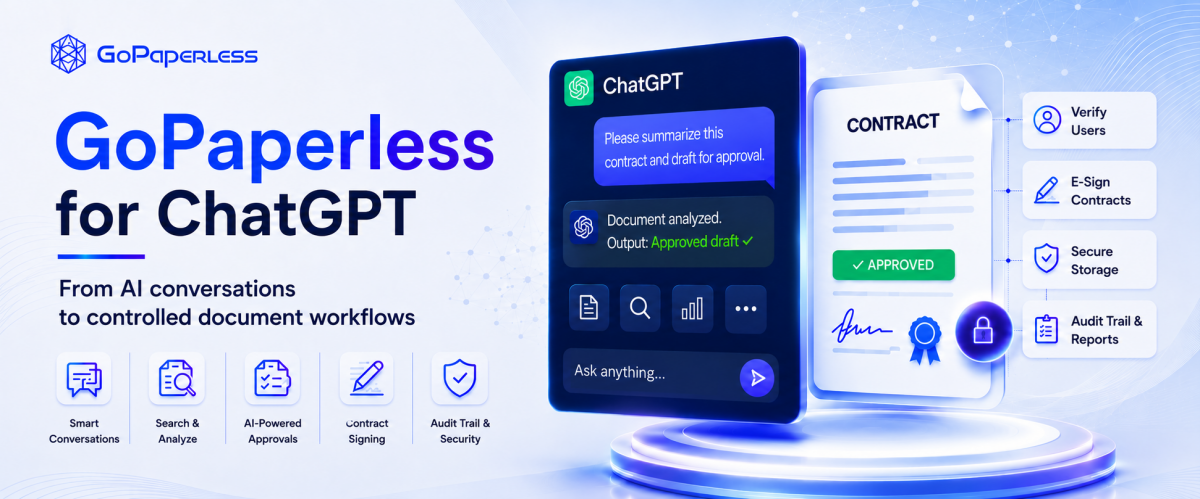
GoPaperless for ChatGPT: Documents, Approvals & E-Signing
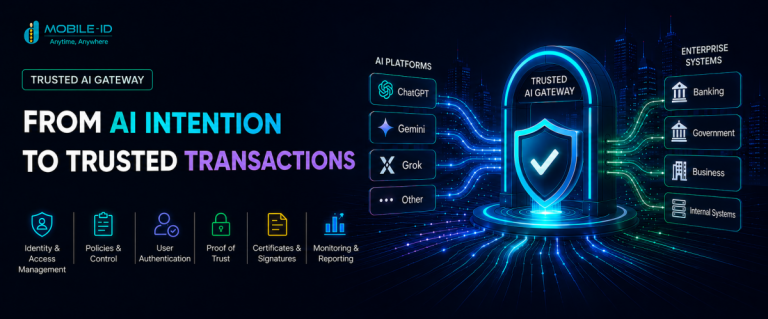
Search, analyze, approve, e-sign and receive the evidence record directly inside ChatGPT — while permissions, policy and signing keys stay within the enterprise’s trust boundary.
AI assists · Humans decide · GoPaperless executes and retains the evidence
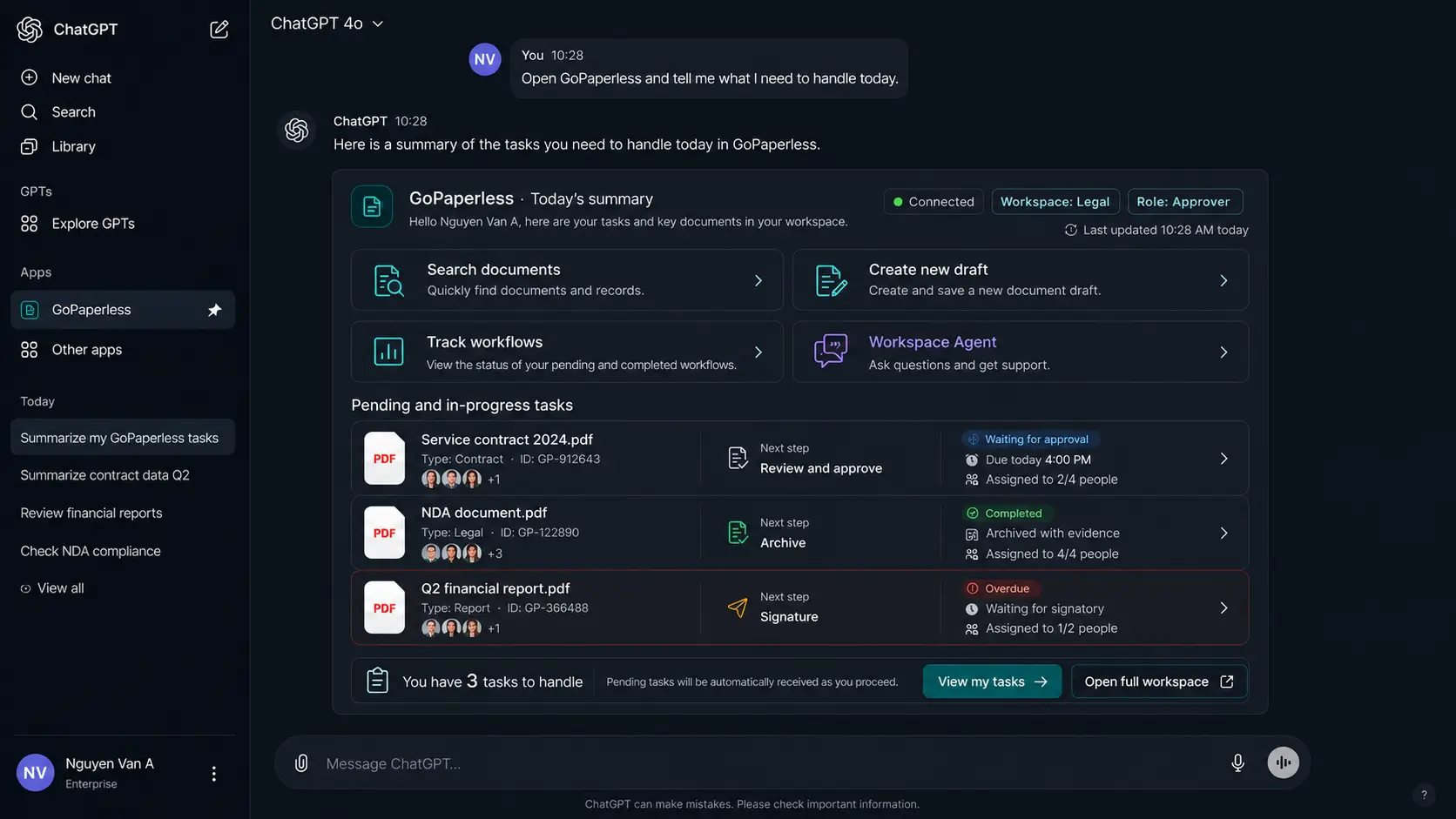 Workspace & role
Pending tasks
Status & evidence
Workspace & role
Pending tasks
Status & evidence
Faster
Find, understand and prepare a transaction in a single conversation instead of switching between apps.
More controlled
Permissions, data scope and policy are checked before every consequential action.
More trustworthy
Every transaction carries a trace, receipt, verification status and an evidence record for audit.
Choose the reading track that fits you
This article is designed for CTOs/CIOs/CISOs evaluating the architecture, while giving Sales/Presales teams something they can use directly in customer conversations.
A new AI experience layer that doesn’t weaken existing controls
GoPaperless for ChatGPT lets users express their goal in natural language, receive a structured business component, check the data and confirm it before the backend executes anything. ChatGPT helps with understanding and orchestration; GoPaperless remains the source of truth for documents, permissions, workflow, e-signing and evidence.
In short: This is not a chatbot that decides on its own. It’s a conversational work interface built on top of GoPaperless, connected through MCP tools with clear schemas, scoped permissions, approval requirements for sensitive actions, and end-to-end evidence logging.
Document intelligence
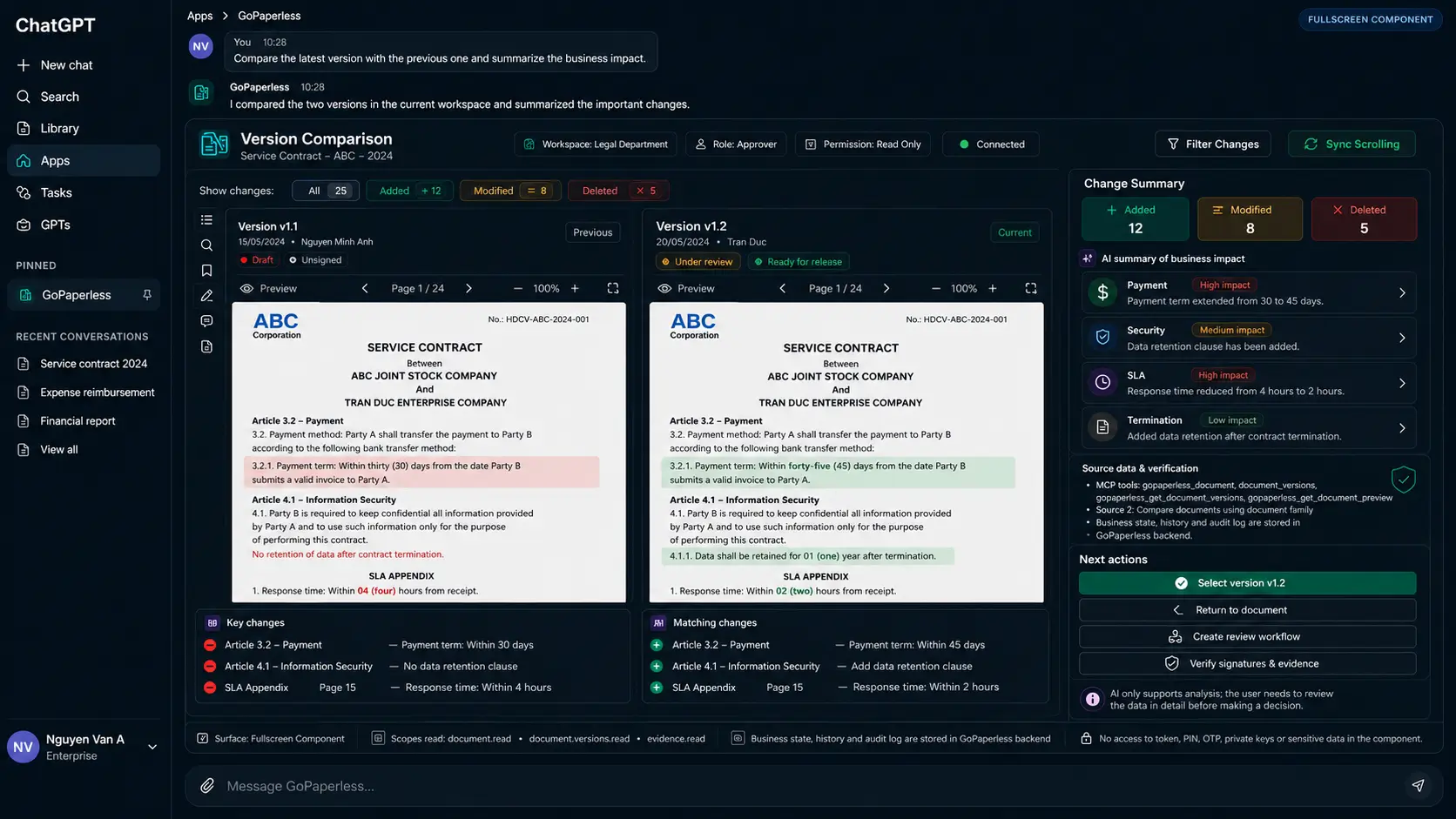
Search, summarize, compare versions, extract entities and flag risk, each linked back to its source.
Grounded · TraceableHumans stay in control
AI prepares the work; an authorized person confirms scope, participants, policy, publishing and signing.
Human approvalVerifiable evidence
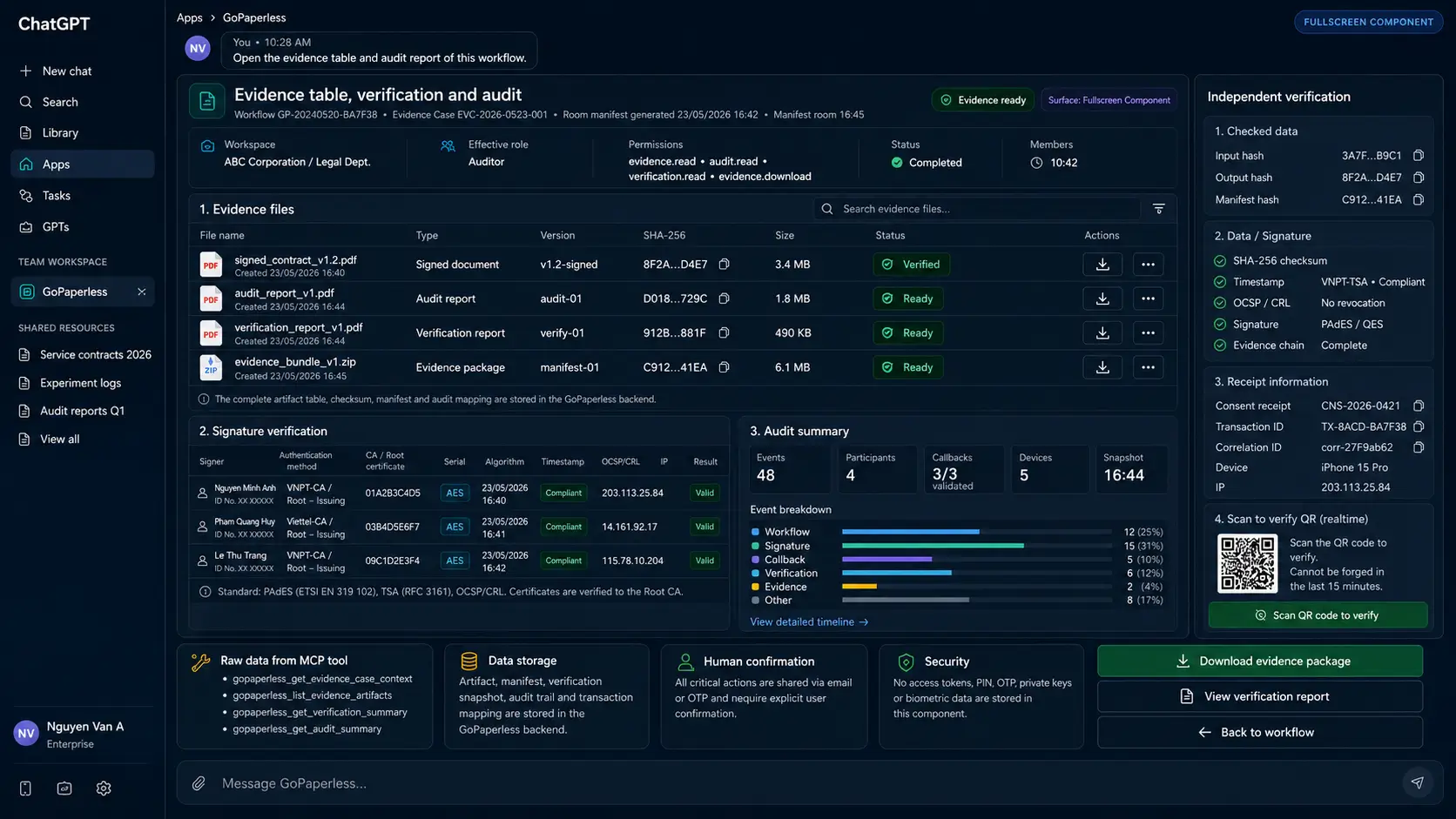
Every transaction result comes with a timeline, hash, signature status, certificate, timestamp and audit event.
Audit readyAI can answer quickly, but enterprise processes demand authority, accountability and evidence
Many organizations already have a DMS/ECM, an approval portal and an e-signing service, yet employees still have to hunt for documents, read through multiple versions, re-key information, switch to email and track status by hand. A pure text chatbot only solves the question-and-answer part; it isn’t enough to carry out a transaction with legal or operational impact.
Fragmented context
Documents, approvers, policy and signing status live across multiple systems. Users must piece the context together themselves before they can act.
AI is not the same as authority
A model can suggest, but it has no inherent right to read, publish, approve, sign or export evidence.
Actions need structured confirmation
Choosing a signer, version, sequence, signing method and policy doesn’t fit into one ambiguous chat message.
Audit must connect the whole chain
The enterprise needs to know who requested what, what the AI proposed, what the user confirmed, what the backend executed, and where the evidence lives.
GoPaperless shows up as a business application right inside the conversation
Users open GoPaperless from the Apps area, connect their account, and pick a workspace and role. When a request comes in, ChatGPT calls the matching MCP tool; GoPaperless returns data and a component for the user to review, choose from and confirm. Tasks with an external impact only run after a confirmation gate.
Six steps from a natural-language question to an evidence record
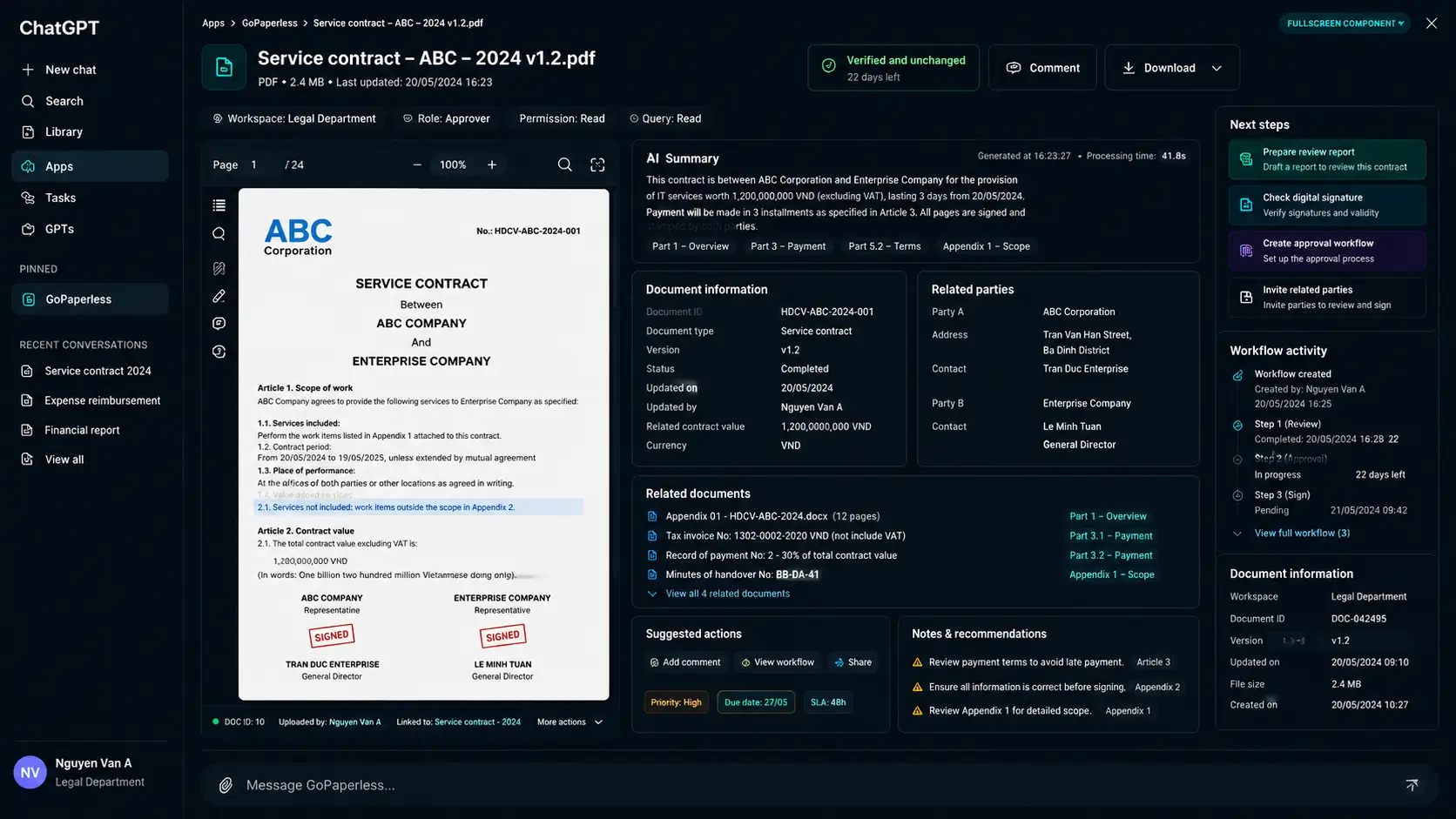
An AI summary must trace back to the source document, version and specific clause
Document intelligence creates value when users can verify the result themselves. GoPaperless ties each summary to the document version, the source clauses, the extracted entities, and the risk areas that deserve attention. Users can open the full text, compare versions, or start a workflow directly from the document they’re viewing.
From an AI-assisted draft to a policy-checked release
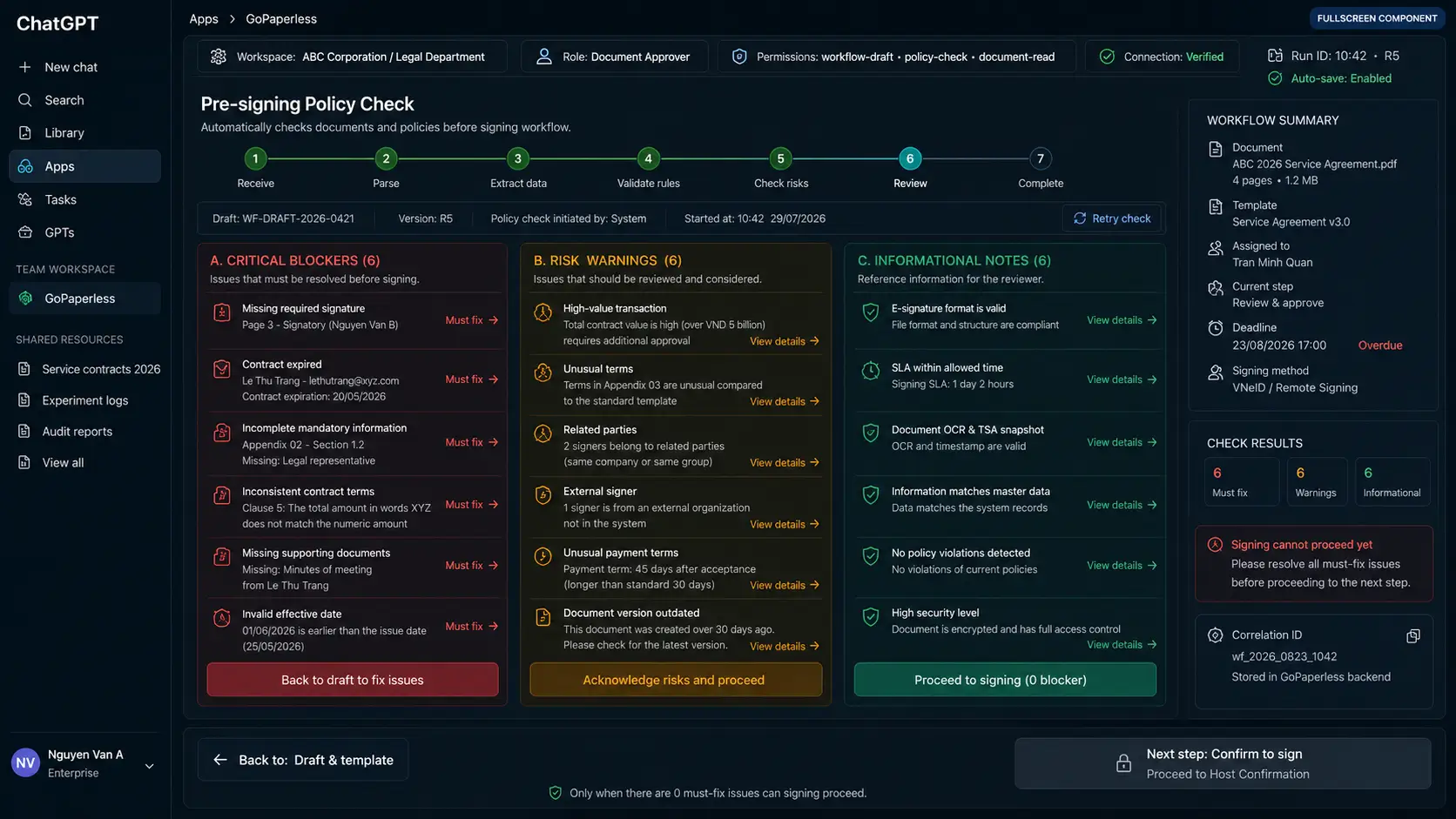
Users can pick a document and a workflow template, add participants, define roles, sequence, deadlines, reminders and signature fields. Before publishing, GoPaperless runs a policy check and shows Pass, Warning or Block so an authorized person can decide.
Create the draft
AI helps fill in data and suggests a configuration, with no external impact yet.
Policy check
Checks participants, authority, version, signature fields, deadlines and mandatory requirements.
Confirm and publish
Shows a transaction summary, impact, recipients and signing method before sending.
A six-layer architecture with clear boundaries of responsibility
OpenAI describes a remote MCP server as a way to expose tools and data to ChatGPT or to API integrations. For GoPaperless, MCP is a tool-contract layer — not a place to store signing keys, self-grant permissions, or replace business policy. Sensitive actions require explicit approval, and shared data must be minimized, logged and controlled.
Reference MCP tool catalog for a POC
get_connection_contextWorkspace, role, scopessearch_documentsSearch within permissionsfetch_documentContent and source citationscompare_versionsStructured diffget_workflowStatus and timelinecreate_workflow_draftCreate an internal draftpreview_policy_checkAssess impact beforehandpublish_workflowRequires confirmationsubmit_approvalRequires confirmationinitiate_signingRequires step-upget_evidence_manifestHash, signature, auditretry_callback_safelyIdempotent operationPermissions are granted by workspace, role, duration and level of impact
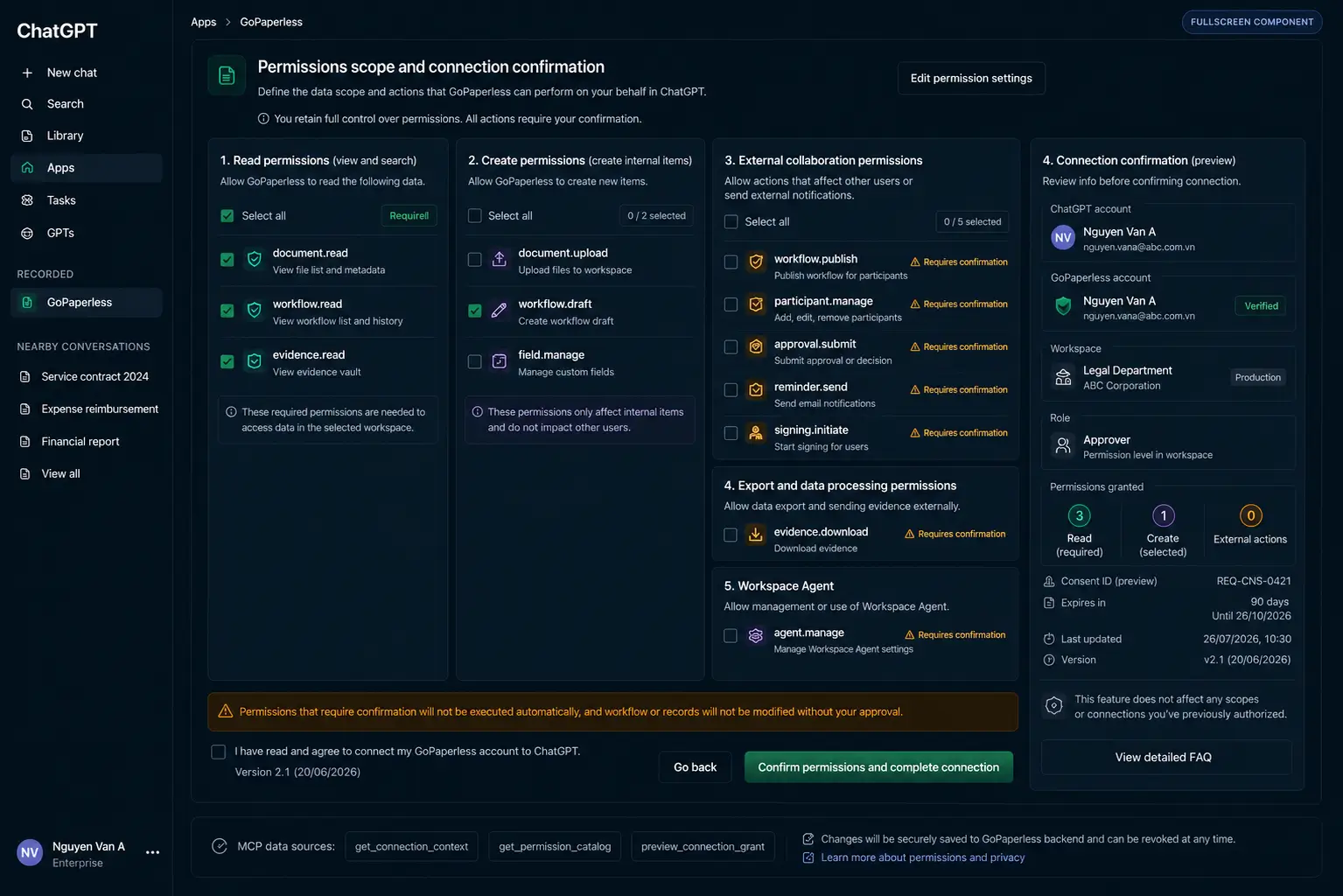
GoPaperless doesn’t treat “account connected” as unlimited permission. A connection receipt must show the account, workspace, role, granted scopes, duration, terms version and the ability to revoke. Actions with an external impact still require confirmation at the moment they’re carried out.
| Permission group | Examples | Impact | Control |
|---|---|---|---|
| Read-only | document.read, workflow.read, evidence.read | Reads data already permitted within the workspace. | Scope + role + tenant filter; can be granted by default per role. |
| Create draft | workflow.draft, field.manage | Creates or edits internal data, not yet sent externally. | Logged for audit; doesn’t need per-action confirmation if policy allows it. |
| External impact | workflow.publish, participant.manage, approval.submit, signing.initiate | Sends information, changes status, or initiates signing. | Re-authorization + policy check + explicit confirmation; step-up when required. |
| Export evidence | evidence.download, audit.export | Takes records or audit data outside the system. | Checks purpose, watermark/label, and logs who downloaded it and when. |
The trust layer must hold up against specific technical questions
| Area | Question to answer | GoPaperless approach |
|---|---|---|
| Identity | Who is performing the action? | Linked account, workspace, role, authenticated session and step-up context. |
| Authorization | Is it allowed in the current state? | Scope, RBAC/ABAC, tenant isolation and a backend policy check. |
| Consent | What scope did the user agree to? | A connection receipt with a duration, terms version and revocation capability. |
| Human control | Can AI act on its own? | A confirmation gate for publish, approval, participant changes, signing and export. |
| Signing key | Where does the signing key live? | Never inside ChatGPT or a UI component; uses an HSM, token/smartcard or remote signing depending on the project. |
| Data boundary | What data reaches the model? | Minimized per tool and scope; no credentials/secrets returned; with logging and redaction. |
| Audit | Is there an end-to-end trace? | Actor, timestamp, tool call, correlation ID, decision, state transition and callback event. |
| Evidence | Can it be independently verified? | Manifest, hash, signature, certificate, timestamp, OCSP/CRL and a QR/verification endpoint. |
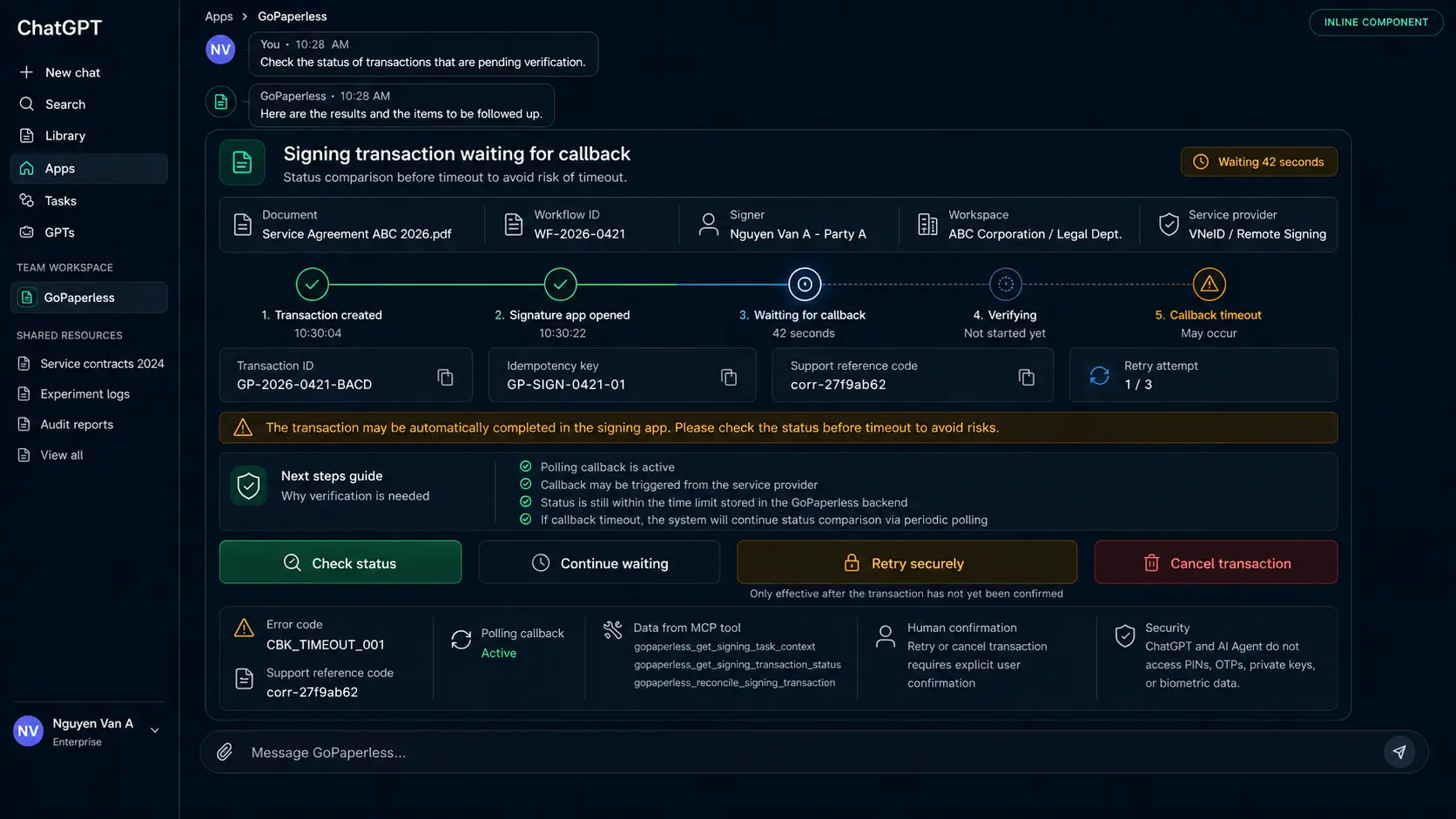
| Retry | Can a callback error create a duplicate transaction? | Idempotency key, safe retry, reconciliation and a matched status. |
| Tenant isolation | Can workspace data mix across tenants? | Tenant context binds the token, query, object authorization and audit. |
Designed for both the happy path and operational exceptions
Cases that must be modeled
- The connection or consent expires mid-process.
- The user loses permission after the draft was created.
- Policy returns a Warning or Block before publishing.
- A signer declines, requests edits, or the deadline passes.
- An external handoff doesn’t complete or the callback is delayed.
- Safe retry must avoid creating a duplicate transaction or signature.
- Incomplete evidence needs a reconciliation status.
- The document version changes after approval.
Cloud, on-premise or hybrid, depending on data residency and trust infrastructure
Fast deployment
A fit for POCs and enterprises that want to reduce platform operating overhead.
- GoPaperless is operated centrally
- Fast tenant and workspace configuration
- Scales with usage
Infrastructure control
A fit for organizations with strict data, internal-network or operational requirements.
- Backend and data stay with the customer
- Integrates with internal IAM, HSM, SIEM
- HA/DR designed to each project’s standard
Keep trust services in a private zone
Combines the ChatGPT experience with a backend and signing infrastructure that stay inside the controlled zone.
- MCP gateway matched to the right topology
- Documents/signing keys never leave the trust zone
- Secure tunnel or private connectivity where applicable
| Component | Main responsibility |
|---|---|
| ChatGPT / OpenAI platform | The conversational experience, tool selection and component rendering, per platform capability. |
| Mobile-ID / GoPaperless | MCP integration, workflow, policy, signing orchestration, evidence and product operation within the contracted scope. |
| Customer | Data, users, roles, policy, process, information classification and deployment approval. |
| CA / TSP / Signing Provider | Certificates, signer authentication, signing/timestamp services and related obligations per the chosen signing method. |
A sales message focused on outcomes and the trust layer
“GoPaperless for ChatGPT helps employees research documents, prepare approvals, initiate e-signing and get the evidence back, all inside ChatGPT. AI assists with analysis, but decision-making authority, policy and signing keys stay within the enterprise system.”
Discovery questions
- How long does it take employees to find the right document and the right version?
- How many systems and emails does one transaction have to pass through?
- Can your current approval process audit who did what, and when?
- Is the enterprise using one e-signing provider or several?
- Where are signing keys, certificates and evidence currently managed?
- Does the enterprise already have a ChatGPT workspace or an AI assistant plan?
Signs of a good-fit customer
Has a document repository but low adoption
Users still ask colleagues, browse through folders, or use the wrong version by mistake.
Approvals run over email
Status is hard to track, rules aren’t consistent, and the audit trail is incomplete.
Multiple e-signing channels
Users have to know which system to use, which method, and reconcile the results themselves.
Already evaluating AI for employees
The customer wants AI to create value but won’t accept losing control over data and transactions.
Handling common objections
Can AI sign or approve on its own?
No. AI only analyzes and prepares. Approval, publishing or signing actions require confirmation from an authorized person; the backend checks permissions and policy before execution.
Does all our data get sent to ChatGPT?
No. The design follows data minimization: a tool only returns the data required within its scope. Credentials, private keys and secrets never enter the context; the data scope is agreed during project design.
Does this replace our current Portal?
Not necessarily. ChatGPT is a new experience channel. The Portal continues to serve administration, in-depth configuration and batch processing; both channels share the same backend and audit trail.
Does it integrate with our existing signing service?
It can integrate through signing orchestration and an appropriate connector, depending on the provider’s API, signing method, certificates, authentication requirements and policy.
Can it be deployed on-premise?
The GoPaperless backend, data and trust services can be designed as cloud, on-premise or hybrid. The specific topology needs an assessment of ChatGPT connectivity, firewall, IAM and data sovereignty.
Every buyer needs a different reason to say yes to a POC
| Audience | What they care about | The right message |
|---|---|---|
| CTO / CIO | Architecture, integration, scalability and lock-in. | MCP tool contracts, API reuse, a backend source of truth, and flexible deployment. |
| CISO | Permissions, tokens, data boundary, prompt injection and audit. | Least privilege, re-authorization, an approval gate, logging and end-to-end evidence. |
| Legal / Compliance | Authority, versioning, intent, verification and records. | Human approval, policy checks, signing trust and the evidence manifest. |
| COO | Processing time, bottlenecks and employee experience. | A single unified flow, fewer app switches, and a clear next step. |
| HR / Procurement | Template processes, reminders, SLAs and multi-party signing. | Workflow templates, roles, deadlines, reminders, approval and signing. |
| Sales Director | Speed of preparing, approving and signing contracts. | Find the right version, compare terms, request approval and track signing right inside the conversation. |
Package the POC around one real process and measurable KPIs
Reference 4–6 week POC
Pick one workflow with enough value to prove the point, but with a controllable scope. Don’t try to integrate the whole enterprise on the first attempt.
KPIs worth measuring in the POC
| Group | Suggested metric | How to assess it |
|---|---|---|
| Efficiency | Time to find a document, prepare a workflow and complete signing. | Compare the pre-POC baseline against the pilot group. |
| Accuracy | Rate of picking the right document, version, approver and signing method. | Cross-check audit events against policy-blocked errors. |
| Experience | Number of app switches, completion rate, support requests. | Telemetry, user interviews and task completion. |
| Trust | Share of transactions with full confirmation, trace and evidence. | Check coverage across all POC transactions. |
| Scalability | Time to add a second tool, policy or workflow. | Assess connector and component reuse. |
System Functional Screen List
Pick a group to see the connection, document, workflow, approval, signing and operations journey. Click any image to zoom in.
Quick answers for CTOs, CISOs, Legal and sales teams
Does GoPaperless for ChatGPT replace the GoPaperless Portal?
No. ChatGPT is a conversational experience layer that helps users complete work more naturally. The Portal remains the right place for administration, in-depth configuration, batch processing and full-scale operations. Both channels can share the same backend, permissions and evidence.
Can AI sign or approve on its own?
No. AI can analyze, prepare a draft, or suggest an action. Approval and signing must be tied to an authorized person, with clear confirmation and an appropriate authentication method.
Does all enterprise data have to be sent to ChatGPT?
No. The architecture prioritizes data minimization and only exposes what’s needed per tool, scope and policy. Signing keys, private keys and sensitive credentials stay within GoPaperless/HSM or other trusted infrastructure.
What does MCP bring to the table?
MCP clearly describes the tools, input/output schema and the boundaries of responsibility. The model plans and requests a tool; the server authenticates, checks permissions, executes the business logic and returns a structured result.
Can the customer’s existing e-signing service be used?
Yes, depending on the provider’s API and trust model. The POC needs to define the signing method, certificates, signer authentication, external handoff, callback, verification and evidence.
Which use case should be chosen for the first POC?
Pick a process with clear documents, a limited number of participants, high enough frequency, and measurable KPIs — for example, reviewing, approving and signing one type of contract or internal memo.
Propose your process and let Mobile-ID scope a POC
We’ll work with your technical and business teams to identify the document source, roles, a minimal set of MCP tools, confirmation gates, signing method and evaluation KPIs.
 Scan to open the POC page
Technical and editorial references
- OpenAI Developers — Building MCP servers for plugins and API integrations.
- OpenAI Developers — MCP and Connectors, including recommendations on approval, logging and data control.
- Mobile-ID Blog — KioWare v2 – Kiosk middleware platform, referenced for the structure of a long technical product article.
- Ascertia Blog — Digital signatures: what they are and why they matter, referenced for how it moves from problem, to trust, to product, to CTA.